

正式動手前,先把版本與環境整理好,比一開始就寫 agent 更重要。
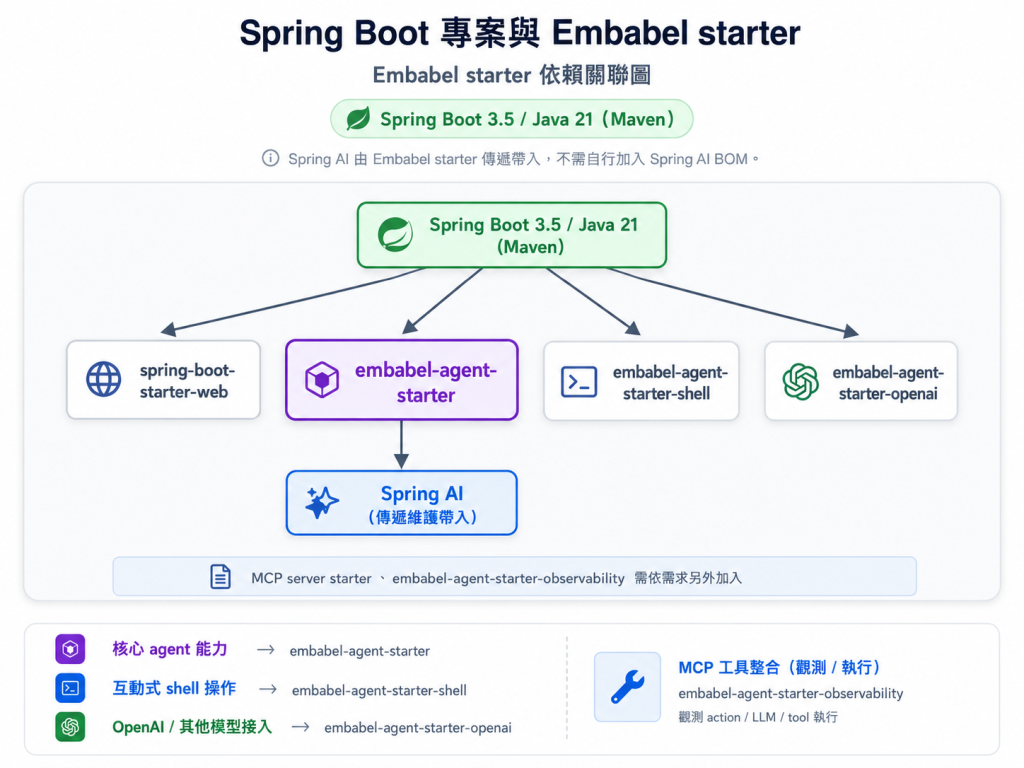
Embabel 站在 Spring Boot 與 Spring AI 之上,因此 starter、Spring Boot 版本、Java 版本與模型 provider 依賴要一起看。版本不合時,錯誤常常不會出現在業務程式,而會出現在啟動或 bean wiring。
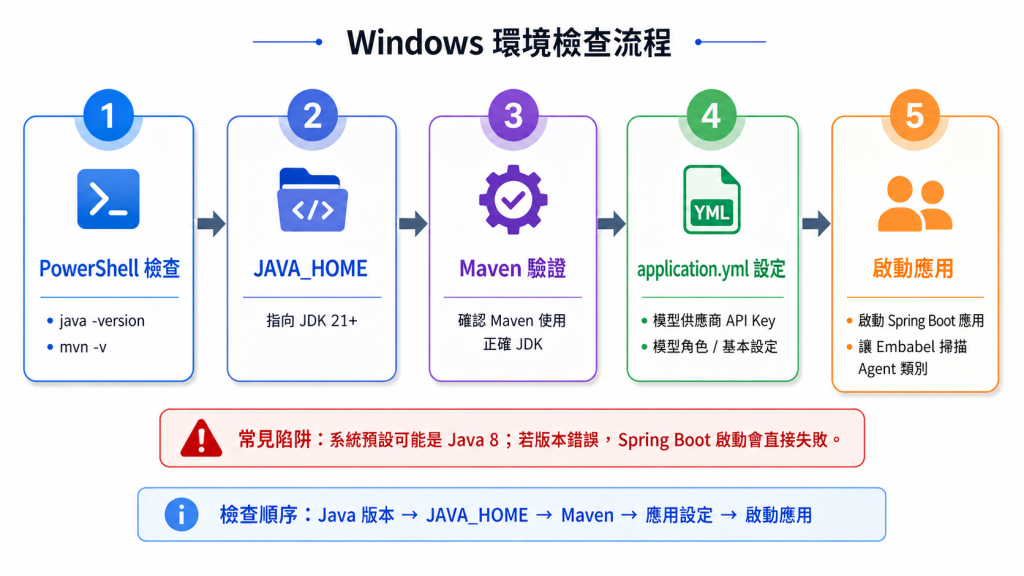
在 Windows 環境下,也要確認 JAVA_HOME、Maven 指到正確 JDK,API key 與 application.yml 設定能被同一個啟動流程讀到。這些是後面所有範例能不能跑起來的地基。
版本現況要先說清楚:目前已發佈的正式版是 Embabel 1.0.0(2026 年 7 月 GA),建構於 Spring Boot 3.5.14 與 Spring AI 1.1.7,尚不支援 Spring Boot 4。至於下一步,官方已把 Spring Boot 4.1 與 Spring AI 2.0 的支援排入 1.5.0(main 分支已切換到這組版本,發佈在即),所以本系列以 1.0.0 + Boot 3.5.x 落地,等 1.5.0 上 Maven Central 再談升級。這種資訊要在系列中提早說清楚,否則讀者很容易第一天就踩到啟動錯誤。
實務上,第一個 Embabel 專案應該先固定 Java 21、Spring Boot 3.5.x、Embabel starter,並確認 OPENAI_API_KEY 或替代 provider 設定。Spring AI 多半由 Embabel starter 傳遞帶入,不要一開始就自行覆寫 BOM,除非你清楚知道二進位相容性。
在 Windows 環境還要特別注意 JAVA_HOME。很多機器 shell 預設仍指向 Java 8,Maven compile 或 Spring context 啟動會出現看似奇怪的錯。環境檢查腳本比直接寫程式更重要。
先把「專案能不能正確啟動」這件事處理乾淨。@Condition、domain @Tool 與 action flow 會另外展開,避免把環境設定和 agent 行為混在同一段。
對應前面說的版本現況,一份鎖定 Embabel 1.0.0 的最小 pom.xml 長這樣:
<?xml version="1.0" encoding="UTF-8"?>
<project xmlns="http://maven.apache.org/POM/4.0.0">
  <modelVersion>4.0.0</modelVersion>

  <!-- 用 Boot 3.5.x parent;Embabel 1.5.0 之前不可用 Boot 4 -->
  <parent>
    <groupId>org.springframework.boot</groupId>
    <artifactId>spring-boot-starter-parent</artifactId>
    <version>3.5.14</version>
  </parent>

  <groupId>com.antechinus</groupId>
  <artifactId>customer-care-agent</artifactId>
  <version>0.1.0-SNAPSHOT</version>

  <properties>
    <java.version>21</java.version>
    <!-- 2026-08 時的正式版;升級前先確認官方公告的相容組合 -->
    <embabel.version>1.0.0</embabel.version>
  </properties>

  <dependencies>
    <!-- Spring Boot 3.x 的 MVC starter(spring-boot-starter-webmvc 是 Boot 4 世代名稱) -->
    <dependency>
      <groupId>org.springframework.boot</groupId>
      <artifactId>spring-boot-starter-web</artifactId>
    </dependency>

    <!-- Embabel 核心 agent 能力 -->
    <dependency>
      <groupId>com.embabel.agent</groupId>
      <artifactId>embabel-agent-starter</artifactId>
      <version>${embabel.version}</version>
    </dependency>

    <!-- 互動式 shell(開發期操作 agent) -->
    <dependency>
      <groupId>com.embabel.agent</groupId>
      <artifactId>embabel-agent-starter-shell</artifactId>
      <version>${embabel.version}</version>
    </dependency>

    <!-- 模型供應商(OpenAI;Anthropic / Gemini 等 Spring AI 支援皆可換) -->
    <dependency>
      <groupId>com.embabel.agent</groupId>
      <artifactId>embabel-agent-starter-openai</artifactId>
      <version>${embabel.version}</version>
    </dependency>
  </dependencies>
</project>
幾個重點:parent 固定在 Spring Boot 3.5.14,Java 21 是基準;Spring AI 1.1.7 由 Embabel starter 傳遞帶入,所以整份 pom 完全沒有出現 Spring AI BOM——這是刻意的,自行覆寫 BOM 是最常見的版本衝突來源。
@ConfigurationProperties
@EnableAgents
@SpringBootApplication
@EnableConfigurationProperties(ActivitySummarizerProperties.class)
public class AntechinusApplication {
    public static void main(String[] args) {
        SpringApplication.run(AntechinusApplication.class, args);
    }
}

@ConfigurationProperties(prefix = "example.activity-summarizer")
record ActivitySummarizerProperties(
    int maxWords,
    float highSpenderThreshold,
    float highTripsPerYearThreshold
) {}
這段只示範啟動邊界:入口類別和設定 record 都是獨立型別,不要把 action、condition 或工具方法寫成類別外的游離方法。後面要接工具時,再把 @Tool 放在 domain object 方法上;要接流程條件時,再把 @Condition 放在 agent 類別中。
寫一份 PowerShell 環境檢查清單:Java 版本、Maven 版本、OPENAI_API_KEY、模型設定、Spring Boot 與 Embabel 版本。
如果你也想進一步學習如何透過 AI 開發 Spring Framework 應用,讓 AI 協助理解框架、撰寫程式、除錯與驗>證,歡迎到 Hahow 看凱文大叔的最新課程【駕馭 AI 的全端實戰養成班:從零打造企業級智慧應用系統】。一起>學習如何駕馭 AI,提升 Spring 應用的開發效率與品質。
課程連結



 iThome鐵人賽
 看影片追技術